Okay, gather around. Subu has a story.
Imagine spending months building your website. Writing content. Getting backlinks. Doing everything right. And then one day, you check Google Search Console and find that Google has happily indexed… your 404 error page.
Not your homepage. Not your best blog post. Your 404 page.
The one that says “Oops, this page doesn’t exist.”
Google crawled it, loved it, indexed it, and is now potentially serving it to real users searching for real things. Meanwhile, your actual content is sitting in a corner, wondering why nobody showed up to the party.
Welcome to the Soft 404 disaster — one of the sneakiest, most underrated SEO problems on the internet, and one that I guarantee is affecting more websites than their owners realize.
Table of Contents
First, Let’s Talk HTTP Status Codes (I Promise This Won’t Be Boring)
Every time someone visits a page on your website, your server sends back a little message to the browser — a status code — that says what’s going on.
The main ones you need to know:
- 200 OK — “Everything’s fine! Here’s the page you asked for.” ✅
- 301 Moved Permanently — “That page moved. Here’s where it lives now.” 🔀
- 404 Not Found — “That page doesn’t exist. Never did. Move on.” ❌
- 500 Server Error — “Something broke on our end. We’re panicking quietly.” 💀
Now here’s where it gets spicy.
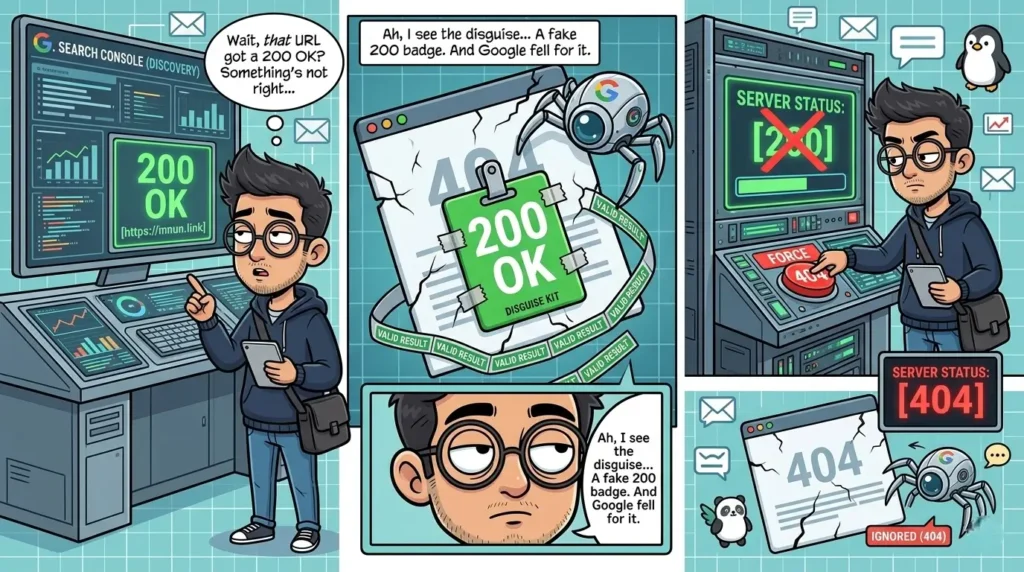
When a user — or Google’s crawler — visits a URL that doesn’t exist, your server is supposed to return a 404 status code. That tells Google: “This page is gone. Don’t index it. Don’t show it to anyone.”
But what if your server returns a 200 status code instead?
That means your server is telling Google: “Yep! Great page! Everything’s wonderful here! Please index this!”
And Google, being the obedient algorithm it is, goes: “Noted. Indexed.”
Congratulations. You’ve just indexed a page that tells your users a page doesn’t exist. You’ve broken SEO in the most ironic way possible.
What Is a Soft 404 and Why Should You Care?
A Soft 404 is what happens when a page that should return a 404 (or 410) error code instead returns a 200 — making Google think it’s a perfectly valid, indexable page.
This happens more often than you’d think, and for surprisingly mundane reasons:
- Your CMS is set up incorrectly and serves a 200 for every URL, even broken ones
- Your custom 404 page was built by someone who didn’t configure the server response
- A page was deleted but the redirect was never set up
- A plugin or theme is overriding your server’s error responses
- Your developer said “it’s fine” and it was, in fact, not fine
The result? Google’s crawl budget gets wasted on pages that have zero value. Your actual good pages get crawled less. And in some cases, these ghost pages start competing with your real content in search results.
It’s the SEO equivalent of your imposter going to work while you’re at home, doing nothing useful, and somehow still getting paid.
The Real Damage This Does to Your SEO
Let me break down exactly why this hurts you:
Google doesn’t have unlimited time to crawl your site. It allocates a crawl budget — a set number of pages it’ll visit in a given period. If your soft 404s are eating up that budget, your important pages get crawled less frequently. New content takes longer to rank. Updates take longer to reflect. It’s death by a thousand bad URLs.
2. Index Bloat
Nobody wants a bloated index. When Google indexes hundreds of error pages, it dilutes the overall quality signal of your site. Google’s systems may start to see your website as low-quality — not because your content is bad, but because a huge chunk of what’s indexed is junk.
3. Duplicate Content Issues
Often, soft 404 pages all look the same — they’re all serving the same error message template. Google sees hundreds of identical pages across your site and gets confused about which one (if any) to rank. Spoiler: it doesn’t rank any of them. But it does use them against you.
4. User Experience Disaster
Imagine a user clicks a Google result, lands on your 404 page, and immediately leaves. High bounce rate. Zero engagement. Google notices. Repeat this enough times and your site’s reputation in Google’s eyes takes a slow, painful hit.
5. Lost Backlink Value
If any external websites linked to a URL that now silently returns a 200-coded error page, that backlink’s SEO value is effectively dead. The page exists in Google’s eyes but has no content worth ranking — so the link juice goes nowhere.
How to Check If This Is Happening to You
Good news: this is actually easy to diagnose. Here’s how:
Method 1: Google Search Console
Go to Search Console → Coverage report → look for pages flagged as “Submitted URL seems to be a Soft 404” or check the “Excluded” tab. If your error pages are showing up here, you have a problem.
Method 2: Manual Check
Visit a URL on your site that definitely doesn’t exist. Something like:
yourwebsite.com/this-page-absolutely-does-not-exist-subu-said-so
If you see a 404-style error page but your browser or a tool reports a 200 status code — that’s a soft 404.
Use a free tool like httpstatus.io to check the actual response code of any URL.
Method 3: Screaming Frog
Crawl your site with Screaming Frog and filter for pages returning 200 codes. Cross-reference with pages that have thin or no content. The ones with almost no text that still return 200? Probable soft 404s.
How to Fix It (The Right Way)
Fixing soft 404s isn’t complicated, but it does require getting into the technical side of things. Here’s the proper approach:
Step 1: Configure your server to return a true 404 (or 410)
A 404 tells Google the page is gone for now. A 410 Gone tells Google it’s gone permanently — which actually gets the page deindexed faster. If a page is truly dead, 410 is your friend.
For WordPress users, a plugin like Redirection or Rank Math can help manage this. For custom-built sites, this needs to be handled at the server level (Apache .htaccess or Nginx config).
Step 2: Set up proper redirects for deleted pages
If a page was deleted but had value (backlinks, traffic), don’t just 404 it — 301 redirect it to the most relevant existing page. This preserves link equity and keeps users from hitting dead ends.
Step 3: Customize your 404 page (but make it serve a 404)
Yes, have a nice, branded, helpful 404 page. Show your logo. Add some Subu energy. Link back to your homepage or popular posts. But make absolutely sure that page is serving a 404 status code in the HTTP header, not a 200.
Step 4: Request removal from Google
For pages already indexed that shouldn’t be, use the URL Removal Tool in Google Search Console to temporarily hide them while the fix propagates.
Step 5: Monitor regularly
Set a recurring reminder to check your Coverage report in Search Console monthly. Soft 404s have a way of creeping back in, especially after site updates, plugin changes, or migrations.
The TL;DR (You Know the Drill)
- A Soft 404 happens when a broken or non-existent page returns a 200 status code instead of a 404.
- Google treats it as a real, indexable page — and indexes your error page like it’s your best content.
- This wastes crawl budget, bloats your index, kills backlink value, and tanks user experience.
- Fix it by configuring proper 404/410 responses, setting up 301 redirects where needed, and monitoring via Google Search Console.
- And if your developer says “the page loads fine, what’s the problem” — show them this article. Gently. Subu’s words, not yours.
The internet is full of ghost pages pretending to be real ones. Don’t let yours be among them.
Your 404 page has one job: tell Google it doesn’t exist. Make sure it’s doing it.
Running into weird indexing issues on your site? Drop your questions in the comments. Subu has seen things. Subu will help.
— Subu, SEO by Subu